
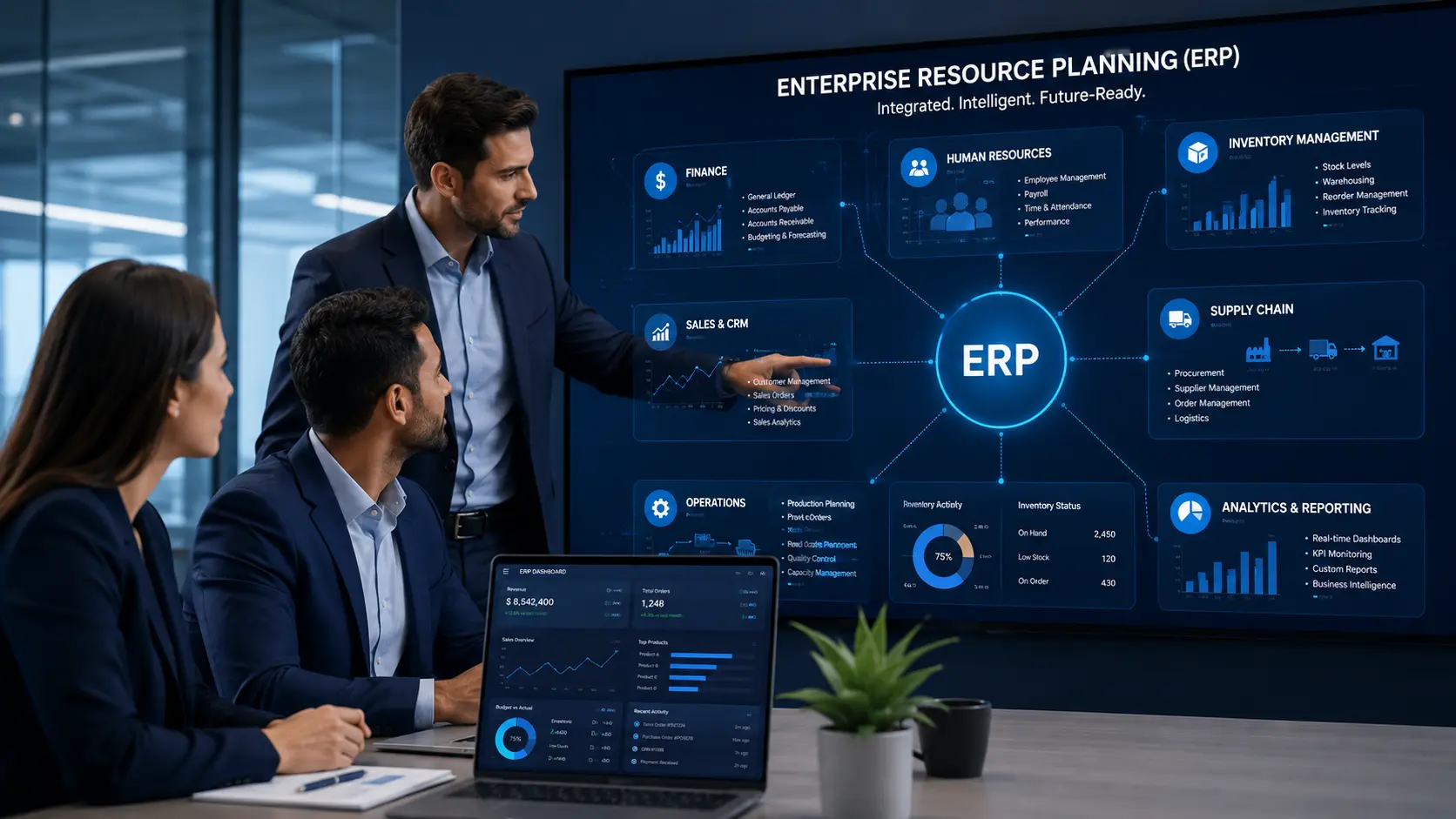
Enterprise Resource Planning (ERP): Meaning, Components, and Examples
Summary
Enterprise Resource Planning (ERP) is a business software system that connects core departments such as finance, human resources, operations, inventory, manufacturing, sales, and supply chain into one centralized platform.
For U.S. businesses, ERP helps reduce manual work, improve data visibility, automate workflows, and create a single source of truth across the organization. At Tekizz IT Services Inc., we help companies plan, build, integrate, and modernize ERP systems that support real business growth.
Introduction
Running a business becomes harder when every department uses a different tool, spreadsheet, or disconnected system. Finance may have one set of numbers, operations may track work separately, HR may manage employee data in another platform, and leadership may struggle to get a clear view of performance.
This is where Enterprise Resource Planning, also known as ERP, becomes valuable.
An ERP system brings business processes together in one connected platform. Instead of teams working in silos, ERP allows departments to share accurate, real-time information and work from the same data source.
For U.S. small businesses, mid-sized companies, and growing enterprises, ERP is no longer only a large corporate tool. Modern cloud ERP and custom ERP systems are now helping businesses improve efficiency, automate daily tasks, and make better decisions.
What Is Enterprise Resource Planning (ERP)?
Enterprise Resource Planning (ERP) is a suite of integrated software applications that helps organizations manage and automate their core business processes.
In simple words, ERP acts like the central nervous system of a company. It connects important departments such as:
- Finance and accounting
- Human resources
- Inventory management
- Sales and customer management
- Manufacturing and production
- Procurement and purchasing
- Supply chain and logistics
- Reporting and analytics
Instead of each department managing its own separate information, ERP creates one unified system where data can move smoothly across the business.
This helps companies improve communication, reduce duplicate work, and manage operations with better control.
ERP Definition
Enterprise Resource Planning is a software system that integrates and manages a company’s core business processes to streamline operations, improve communication, and provide real-time visibility across departments.
The main purpose of ERP is to help businesses organize data, automate workflows, and create a single source of truth for better decision-making.
How Enterprise Resource Planning Works
An ERP system works by connecting different business functions through a shared platform and centralized database. When one department updates information, the relevant data becomes available to other authorized teams in real time.
1. Centralized Database
The biggest strength of ERP is its centralized database. This database stores important business data in one place, making it easier for departments to access accurate and updated information.
For example, when the sales team confirms an order, the inventory team can see stock requirements, the finance team can track revenue, and the operations team can prepare delivery or production steps.
This reduces data silos and improves coordination across the business.
2. Process Automation
ERP systems help automate repeated business tasks. This can include order processing, payroll, purchase approvals, inventory updates, invoice creation, reporting, and compliance tracking.
Automation reduces manual work and lowers the chance of human error. It also helps employees spend more time on valuable work instead of repetitive administrative tasks.
3. Modular Structure
Most ERP systems are built with modules. A module is a specific part of the ERP system designed for a particular business function.
For example, a company may start with finance, inventory, and sales modules. Later, as the business grows, it can add HR, procurement, manufacturing, or reporting modules.
This modular structure makes ERP flexible and scalable.
4. Real-Time Reporting
ERP systems collect data from different departments and turn it into reports, dashboards, charts, and business insights.
This helps business owners and managers understand what is happening across the company without waiting for manual reports.
Key Takeaways About ERP
- ERP software connects core business functions into one system.
- It helps departments share real-time data and reduce silos.
- ERP improves efficiency by automating workflows and reducing manual work.
- Cloud ERP systems allow remote access and easier scalability.
- ERP systems can be customized based on industry, company size, and business process.
- Successful ERP implementation requires proper planning, training, and change management.
Why ERP Is Important for U.S. Businesses
Many U.S. businesses are trying to grow while managing complex operations, customer expectations, workforce challenges, supply chain needs, and financial visibility.
When systems are disconnected, growth becomes harder. Teams spend more time fixing data issues, checking spreadsheets, and following up manually.
ERP helps solve this by creating a connected digital foundation.
With ERP, businesses can:
- Improve operational visibility
- Reduce duplicate data entry
- Speed up internal workflows
- Improve financial reporting
- Track inventory more accurately
- Manage employees and payroll better
- Improve customer order processing
- Make faster business decisions
For companies that want to modernize operations, ERP can become a major step toward digital transformation.
Main Components of an ERP System
The exact components of an ERP system depend on the needs of the business. However, most ERP systems include several core modules.
1. Finance and Accounting
The finance module helps manage transactions, invoices, payments, budgets, tax records, cash flow, and financial reporting.
This module gives leadership a clearer view of revenue, expenses, profitability, and overall financial health.
2. Human Resources
The HR module helps manage employee records, attendance, payroll, onboarding, leave management, performance tracking, and compliance documentation.
It helps HR teams reduce paperwork and keep employee information organized.
3. Inventory Management
The inventory module helps businesses track stock levels, product movement, warehouse activity, reorder points, and inventory costs.
This is especially useful for retail, manufacturing, logistics, and distribution businesses.
4. Supply Chain Management
The supply chain module helps manage procurement, vendor relationships, purchase orders, logistics, shipping, and delivery tracking.
It helps companies improve planning and reduce supply chain delays.
5. Manufacturing and Production
The manufacturing module supports production planning, material requirements, work orders, quality control, and equipment usage.
This helps manufacturing businesses improve efficiency and reduce downtime.
6. Sales and CRM
Some ERP systems include customer relationship management features. This helps businesses track leads, customers, quotes, orders, communication history, and sales performance.
ERP and CRM can work together to improve both internal operations and customer experience.
7. Reporting and Analytics
The reporting module turns business data into dashboards, charts, and insights. This helps managers track performance across departments and make more informed decisions.
Types of ERP Systems
Different businesses need different types of ERP systems. Choosing the right ERP depends on company size, industry, budget, security needs, and long-term growth plans.
Cloud ERP
Cloud ERP is hosted online and accessed through the internet. It is popular because it is flexible, scalable, and easier to access from different locations.
Cloud ERP is often useful for growing U.S. businesses that want remote access, faster updates, and lower infrastructure maintenance.
On-Premise ERP
On-premise ERP is installed on company-owned servers. This option gives businesses more direct control over infrastructure and data, but it usually requires more internal IT support.
Some companies choose on-premise ERP because of strict security, compliance, or customization needs.
Hybrid ERP
Hybrid ERP combines cloud and on-premise systems. This can be useful for businesses that want cloud flexibility while keeping some sensitive systems internal.
Industry-Specific ERP
Industry-specific ERP is designed for the unique needs of a particular industry. For example, a healthcare business, manufacturing company, logistics provider, or financial services firm may need different ERP workflows and compliance features.
Small Business ERP
Small business ERP is designed for small and mid-sized companies that need essential business management features without unnecessary complexity.
This type of ERP can be easier to implement and more affordable for growing businesses.
Custom ERP
Custom ERP is designed around a company’s specific process. Instead of forcing the business to adjust to generic software, custom ERP supports the way the business already works.
For companies with unique workflows, custom software development services can help create ERP systems that match exact operational needs.
ERP Examples in Business
ERP can be used across many industries and business models. Here are a few simple examples.
Example 1: Retail Business
A retail company can use ERP to manage inventory, sales orders, supplier purchases, accounting, customer records, and store performance from one system.
When inventory gets low, the ERP system can alert the purchasing team or create a reorder workflow.
Example 2: Manufacturing Company
A manufacturing business can use ERP to plan production, track raw materials, manage work orders, monitor quality, and calculate production costs.
This helps the company reduce delays and improve operational control.
Example 3: Healthcare Organization
A healthcare organization can use ERP to manage HR, procurement, finance, billing workflows, reporting, and internal operations.
ERP can also help improve visibility across departments while supporting better process control.
Example 4: Logistics Company
A logistics business can use ERP to manage shipments, vehicles, routes, warehouse data, billing, and customer service workflows.
This helps teams track operations more clearly and improve delivery coordination.
Example 5: SaaS or IT Services Company
A SaaS or IT services company can use ERP to manage projects, billing, subscriptions, support tickets, employee allocation, sales pipelines, and financial reporting.
This gives leadership better visibility into business performance.
Benefits of ERP Software
Improved Efficiency
ERP reduces repeated manual work by automating common business processes. This helps teams complete tasks faster and with fewer errors.
Better Data Visibility
ERP gives managers access to real-time data across departments. This helps leadership understand performance without depending on separate reports from different teams.
Stronger Collaboration
When teams work from the same system, communication becomes easier. Finance, operations, sales, HR, and supply chain teams can coordinate with fewer delays.
Cleaner Reporting
ERP creates reports from one shared data source. This improves accuracy and makes planning, budgeting, forecasting, and performance tracking easier.
Scalability
As a business grows, ERP can support more users, more departments, more workflows, and more data.
Better Customer Service
When teams have access to accurate information, they can respond to customers faster and provide better service.
ERP vs CRM: What Is the Difference?
ERP and CRM are both business software systems, but they focus on different areas.
ERP focuses on internal business operations such as finance, HR, inventory, procurement, supply chain, and production.
CRM focuses on customer relationships, sales activities, leads, communication, support, and customer engagement.
In many businesses, ERP and CRM work together. For example, CRM may track a customer order, while ERP manages inventory, invoicing, fulfillment, and financial reporting related to that order.
Common ERP Implementation Challenges
ERP can bring major benefits, but implementation must be handled carefully. A poorly planned ERP project can create confusion, cost overruns, and low user adoption.
Common ERP challenges include:
- Unclear business requirements
- Poor data migration planning
- Lack of employee training
- Too much customization without strategy
- Weak integration with existing systems
- No clear implementation timeline
- Limited change management
The best ERP projects start with process understanding. Before building or implementing ERP, businesses should identify how work is currently done and where improvements are needed.
How to Choose the Right ERP System
Choosing the right ERP system is an important decision. Businesses should focus on long-term needs, not only short-term features.
Before selecting ERP software, consider:
- Can the ERP scale as the business grows?
- Does it support your industry needs?
- Can it integrate with your current tools?
- Is the system easy for employees to use?
- Does it provide real-time reporting?
- Does it support secure access control?
- Can it be customized where needed?
- What is the total cost of ownership?
- What support and maintenance will be required?
If your business needs ERP planning, integration, or custom development, web application development services can help build secure dashboards, portals, and connected business systems.
How Tekizz IT Services Inc. Can Help with ERP
Tekizz IT Services Inc. is a U.S.-registered IT services company helping businesses build scalable, secure, and modern software solutions.
We help companies design, develop, integrate, and modernize ERP-style systems based on real business workflows.
Our ERP-related services can include:
- Custom ERP software development
- Cloud ERP planning and implementation support
- ERP dashboard development
- Finance and accounting workflow automation
- Inventory and supply chain module development
- HR and employee management systems
- ERP and CRM integration
- API integration with third-party tools
- Role-based admin panel development
- Reporting and analytics dashboards
- Cloud deployment and performance optimization
For businesses that need secure infrastructure and scalable deployment, our cloud and DevOps services can support ERP hosting, monitoring, automation, and long-term reliability.
Final Thoughts
Enterprise Resource Planning is one of the most effective ways to connect business departments, improve visibility, and reduce operational complexity.
ERP helps companies move away from disconnected tools and toward one connected system where teams can work with accurate, real-time information.
For U.S. businesses, ERP can support better planning, stronger reporting, faster workflows, and long-term scalability. However, the success of ERP depends on choosing the right approach, preparing the team, and implementing the system carefully.
Ready to Build or Modernize Your ERP System?
Tekizz IT Services Inc. helps U.S. businesses build secure, scalable, and custom software systems that connect operations, automate workflows, and improve decision-making.
Contact Tekizz IT Services Inc. today to discuss your ERP development, ERP integration, cloud ERP, or business automation project.